
- New
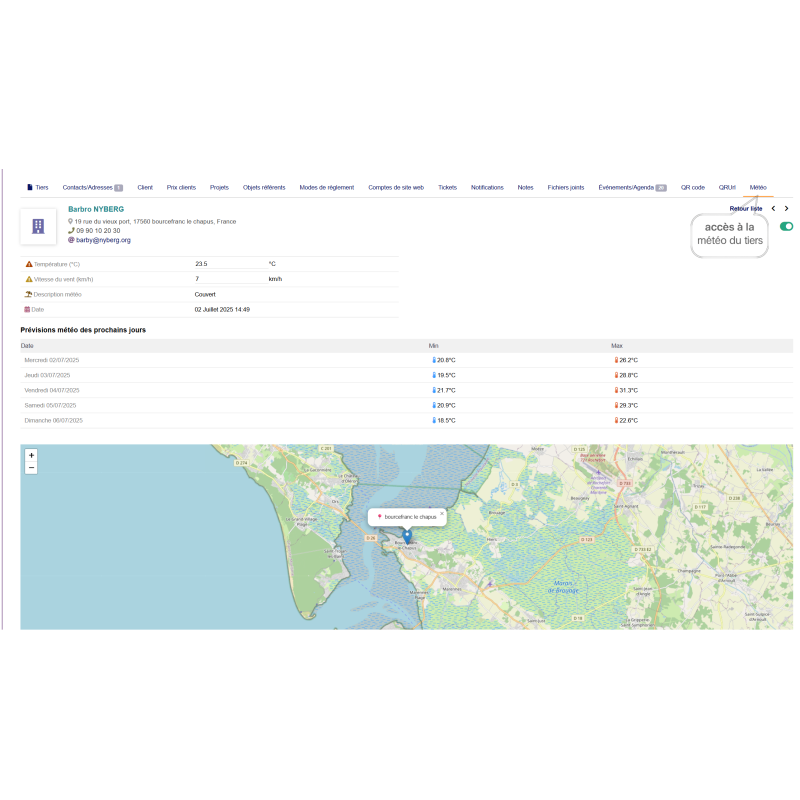


Weather module for Dolibarr, allowing you to display the current weather and forecasts for the following days for third parties (customers, suppliers, contacts) and projects. It uses the Open-Meteo API to provide accurate weather information.
 Garanties sécurité
(à modifier dans le module "Réassurance")
```html
 |
📌 Module version: 24.0.0 📅 Last updated on: 06/26/2026 👤 Publisher/License: Philippe GRAND / GPL 🌍 Interface languages: 📧 Support: email at [email protected] ✅ Compatibility: Dolibarr 24.0.x 💡 Free updates for 1 year for the same version, then 50% discount on the next version. |
 |
The UltimateMeteo module displays real-time weather information directly in Dolibarr from third-party, supplier and contact cards. It uses the address saved in Dolibarr, including the postal code and city, to automatically retrieve GPS coordinates, query weather services and display useful information for your teams.
With UltimateMeteo, you can view current weather conditions, forecasts for the coming days and an interactive OpenStreetMap map, without leaving your Dolibarr environment.
The module uses free APIs, including Open-Meteo and OpenStreetMap Nominatim, and requires no API key.
Dolibarr v24 compatibility: the module has been updated to follow Dolibarr 24 conventions and patterns.
Fix for 403r errors on OpenStreetMap maps: added referrerPolicy and OpenStreetMap attribution in compliance with OSM tile usage rules.
Leaflet stabilized at version 1.9.4: uses a fixed Leaflet version with SRI integrity verification instead of an unversioned CDN URL.
Secure API calls: replaced file_get_contents with cURL and a compliant User-Agent for external API calls.
Smart weather data cache: weather data is stored in the database with a 30-minute cache to avoid repeated API calls and excessive record accumulation.
Dynamic time zone: the module now uses Dolibarr's time zone configuration through the MAIN_TIMEZONE constant instead of a hard-coded time zone.
Complete WMO weather codes: added weather codes covering snow, showers, thunderstorms and hail.
Improved internationalization: weather descriptions now use Dolibarr's native translation system.
Wiki help links: added contextual links to the official module documentation.
From the Weather tab, the module displays the key information needed for decision-making:
| ✅ Current temperature | ✅ Wind speed |
| ✅ Weather description | ✅ Observation date and time |
| ✅ 5-day forecast | ✅ Minimum and maximum temperatures |
| ✅ Interactive OpenStreetMap map | ✅ Location of the third party or contact city |
The module automatically adds a Weather tab to the following cards:
| ✅ Third parties | ✅ Customers |
| ✅ Prospects | ✅ Suppliers |
| ✅ Contacts | ✅ Addresses |
Construction & building trades: check the weather before planning an outdoor intervention, such as roofing, exterior painting or foundation work.
Agriculture & landscaping: check weather conditions before mowing, treatment, planting or any on-site intervention.
Transport & logistics: anticipate weather conditions at the destination before a delivery or pickup.
Events & outdoor services: adapt on-site logistics according to the forecast, such as marquees, heating, equipment or staff organization.
Field sales teams: help your sales representatives organize their trips more efficiently by taking weather conditions into account.
Customer service & after-sales service: qualify certain weather-related incidents more quickly, such as water infiltration, outages or outdoor damage.
UltimateMeteo displays an interactive map based on OpenStreetMap and Leaflet 1.9.4.
The map includes:
A marker positioned on the third party or contact city
A popup showing the location name
Zoom +/− controls
OpenStreetMap attribution compliant with tile usage rules
When the Weather tab is opened, Dolibarr automatically performs the following operations:
Retrieves the postal code and city saved on the Dolibarr card
Geocodes the address using the OpenStreetMap Nominatim API
Retrieves GPS coordinates
Queries the Open-Meteo API
Displays current weather, forecasts and the interactive map
Since version 24.0.0, UltimateMeteo uses a smart cache to optimize performance and limit API calls.
Data is stored in the llx_ultimatemeteo_currentweather table
If data exists and is less than 30 minutes old, it is updated instead of creating a new row
If no recent record exists, a new record is created
This mechanism prevents excessive accumulation of rows in the database
UltimateMeteo relies on free APIs and requires no registration or API key:
| Open-Meteo | Current weather and forecasts |
| OpenStreetMap Nominatim | Address geocoding to GPS coordinates |
| Leaflet 1.9.4 | Interactive map display |
| OpenStreetMap Tiles | Map tiles |
After installing the module, permissions can be configured by user group from:
Home → Setup → Users & Groups → Groups
| Read weather data | Allows users to view weather tabs on cards |
| Create / Modify | Allows users to trigger a weather data refresh |
| Delete | Allows users to delete weather records |
The weather is not displayed → Check that the third-party or contact card has both a postal code and a city filled in.
The map displays "Access blocked" or "403r" → Check that you are using version 24.0.0 of the module, which fixes this issue related to the OpenStreetMap policy.
Is weather data updated automatically? → Data is retrieved each time the Weather tab is opened, with a 30-minute cache.
Does the module work offline? → No, the module requires Internet access to query Open-Meteo and Nominatim.
Is an API key required? → No, UltimateMeteo uses free APIs with no API key required.
Which languages are supported? → The module is available in French, English, German, Spanish and Italian.
View weather information directly in Dolibarr without switching tools
Plan outdoor interventions more efficiently
Anticipate risks related to rain, wind, frost, snow or thunderstorms
Improve preparation for deliveries, worksites and field appointments
Access weather forecasts directly from customer, supplier and contact cards
Use a simple solution with no API key and native Dolibarr integration
The full module documentation is available on the official Dolibarr wiki:
👉 Dolibarr Wiki – UltimateMeteo Module (EN)
Would you like to test the module before purchasing it? Log in to DoliWeb.com, the online Dolibarr demo platform, and try UltimateMeteo directly in your browser, with no installation required.

```
Weather module for Dolibarr, allowing you to display the current weather and forecasts for the following days for third parties (customers, suppliers, contacts) and projects. It uses the Open-Meteo API to provide accurate weather information.


